HOW TO ACCESS VPS USING RDP CONNECTION
After completing payment and activating your VPS you will receive an email. You need to take note of the following VPS details:
1. Your Server IP address : It can be like: 149.56.202.16
2. Username – *Administrator
3. Password – *F4857457
*Information displayed is an example and will be used as an illustration for this tutorial
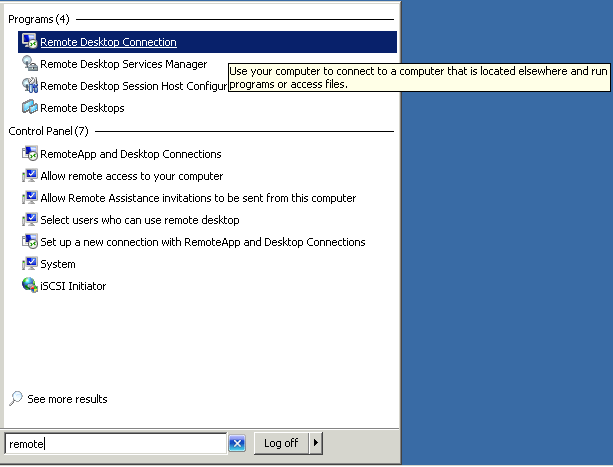
Step 1: Open Remote Desktop Connection on your PC by clicking on Start and Search for “Remote Desktop Connection”
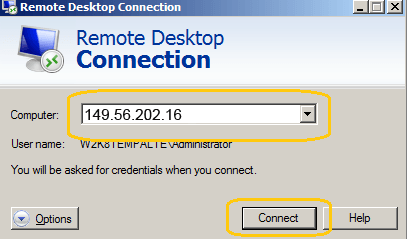
Step 2: Copy and Paste your Server IP address into the Computer field and click Connect
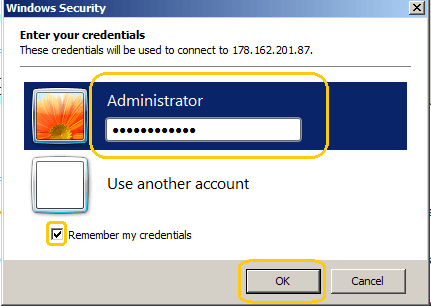
Step 3: Type User Name Administrator and your VPS password. Check the box to remember the password and click Ok
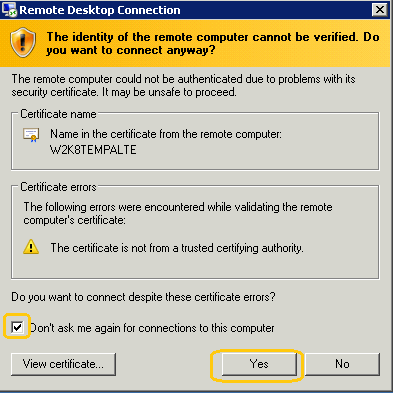
Step 4: Check the box – “Don’t ask me again for connections to this computer” and Click Yes
You should now be presented with a Windows Desktop with a blue background.