METATRADER 4 AUTOMATIC STARTUP GUIDELINE
VIDEO TUTORIAL
There are many ways to enable Windows auto startup program. In this tutorial we will learn the most easy and effective way to enable MT4/MT5 automatic start up. Hope from above video tutorials you got the basic understanding about it.
So lets start:
- First download Auto Login software. This software will automatically login your VPS if your VPS take any restart.
- Install Auto Login soft and activate it by providing your VPS credentials that is provided by FxVPS Inc.
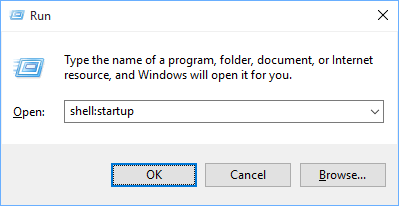
- Now we have to find Auto Startup folder to add program for automatic startup. So just press Win+R from your keyboard.
- RUN window will open then type Shell:startup and press ENTER.
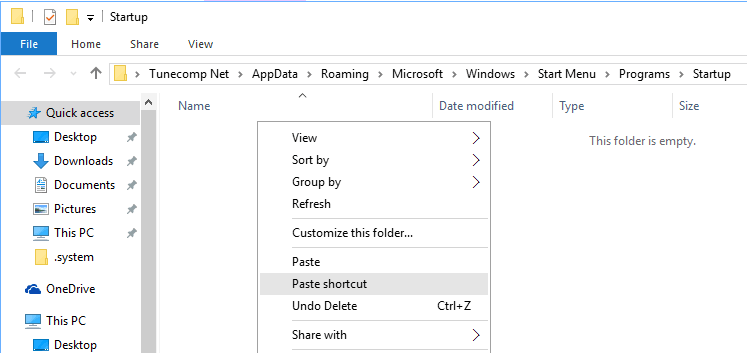
- Windows Startup folder will open and you can take a short cut of this folder and keep it in your VPS desktop. You need to pest your MT4 short cut in this folder.
 .
.
- If you want to keep 2 MT4 short cut in this folder then that 2 MT4 will be open automatically if your VPS takes any sudden restart.
All done!